You can charge an entry fee to anyone who joins your competition; the money is deposited directly into your account, and you won't have to process payments manually.
Requirements: Stripe Connect and manual approval
The entry fee uses Stripe Connect to split the payment between the platform and the organizer. Before enabling it, you need two things: connect your payment account (or your organization's, if you organize with one) from "My account" / payment settings, and turn on "Approval-based enrollment" for the competition — the team, player, or pair is only created once the payment is confirmed, so you cannot charge without that intermediate step.
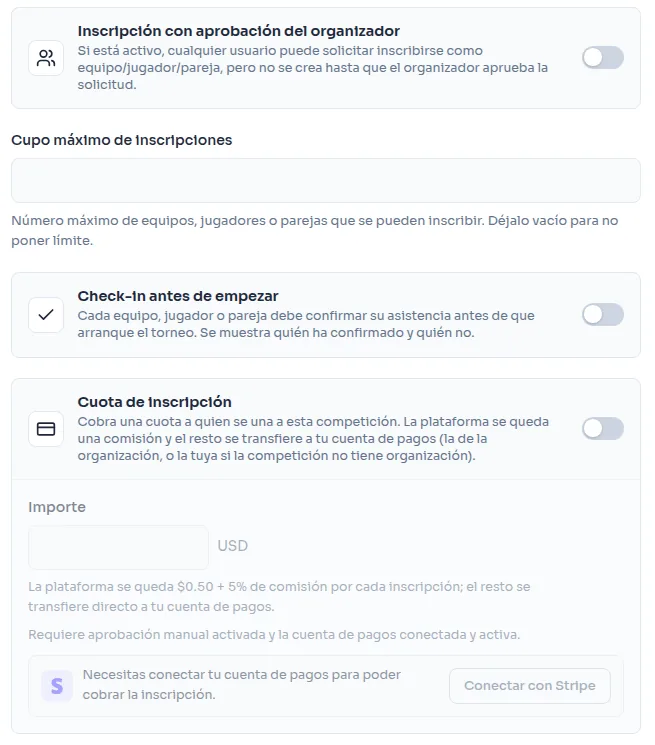
How the money is split
A platform fee (a fixed amount plus a small percentage) is deducted from each entry, and the remainder is automatically transferred to your Stripe account as soon as you approve the request. If the amount you've set is too low to cover that fee, the system won't let you turn on the entry fee until you raise it.
Rejecting an already-paid request
If you reject a request that has already been charged, the payment is automatically refunded — including the portion that had already been transferred to your account — with no manual refund handling on your side.
Maximum entry cap
You can combine it with a maximum number of teams, players, or pairs: once the cap is reached, no further sign-ups or join requests are accepted, regardless of whether a fee applies.
Disconnecting your payment account
If you disconnect your Stripe account (or your organization's), any competition that had the entry fee enabled automatically falls back to free enrollment; it does not remain locked with no way to charge.